
Disgrifiad
WP Ads Within Contents gives you facility to show Ads Within Post. You can Show ads Before and After the Content.
You can also use ShortCode [AdsWithin] to place ads within contents.
You’ve two options to place ads within contents.
* Using ShortCode
* Automatically at the start or end of contents
By using ShortCode you can place ads anywhere in the post content.
Block One, and Block Two are automatic ways to place ads within your post contents.
Lluniau Sgrin

Gosod
Step 1
- Download zip file and Extract it
- Upload wp-subscriber-form folder to your /wp-content/plugins/ folder.
- Go to the ‘Plugins’ page in the menu and activate the plugin.
Step 2
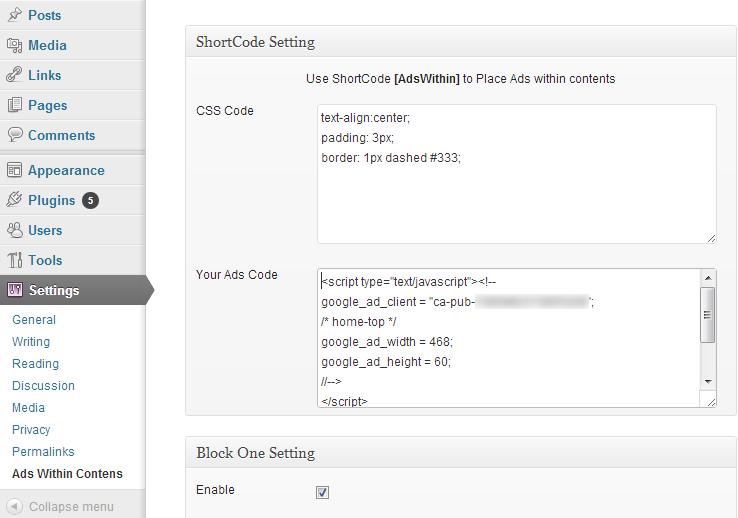
- Go to Wodpress Admin Panel > Setting > Ads Within Contents
- If you want to place ads with shortcode, then place Ads Code in the ShortCode Setting -> Your Ads Code
- For automatic ways enable/disable Blocke one and two, set Ads Code there
- In Addition you can set any css style for any block
Cwestiynau Cyffredin
- What is the ShortCode for ads?
-
[AdsWithin]
- Can I use only ShortCode to place ads within post contents?
-
Yes, Go to Wodpress Admin Panel > Setting > Ads Within Contents, Disable Block One and Block Two.
Adolygiadau
There are no reviews for this plugin.
Contributors & Developers
“WP Ads Within Contens” is open source software. The following people have contributed to this plugin.
Cyfranwyr
Translate “WP Ads Within Contens” into your language.
Interested in development?
Browse the code, check out the SVN repository, or subscribe to the development log by RSS.